> ## Documentation Index
> Fetch the complete documentation index at: https://docs.tied.com/llms.txt
> Use this file to discover all available pages before exploring further.
# How a message flows
> From a customer's first message to a billed resolution — every step, and where the decisions get made.
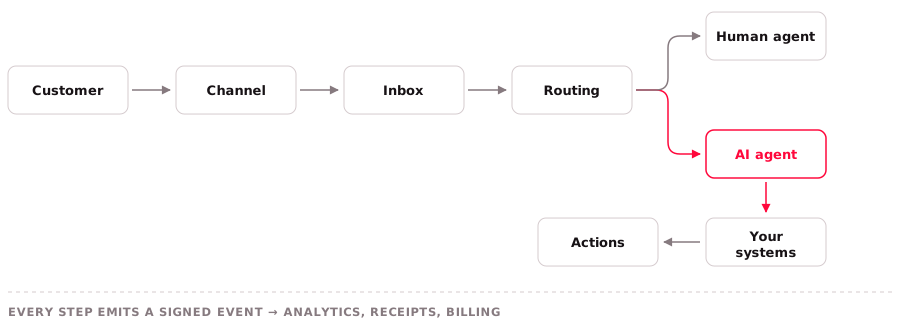
Everything in Tied is one path repeated. Understanding it once explains routing, handoff, analytics and your invoice all at the same time.
 ## 1. The message arrives on a channel
A customer sends something — an iMessage to your Apple Messages business account, a text to your 10DLC number, a WhatsApp message, a web chat. The **channel** determines what the message can contain, what it costs to deliver, and what rich surfaces are available in reply.
What Tied does here is normalise. By the time the message reaches the next step, an Apple List Picker response and a WhatsApp button tap look structurally the same to everything downstream.
Normalisation is lossy in one direction worth knowing about: a tapped quick reply on Apple Messages
returns only its label text, with no stable key. List Picker is the only AMB primitive with
dependable IDs. See [Known limitations](/channels/apple-messages/limitations).
## 2. It lands in an inbox
The channel is the transport; the **inbox** is the configured surface with a team, business hours, an assignment policy and possibly an AI agent attached. The same channel type can back several inboxes — support and sales on separate numbers — and they can behave completely differently.
The contact is resolved here too. If this person has messaged you before on any channel, this conversation joins their history rather than starting a new identity.
A customer's closing courtesy on a resolved or snoozed conversation is not a new request. A message counts as a goodbye only when all of
these hold:
* The whole message, ignoring case, spacing and one trailing period or exclamation mark, is on a short English list: `thanks`, `thank you`,
`thx`, `ty`, `ok thanks`, `ok`, `okay`, `got it`, `great`, `perfect`, `sounds good` or `will do`, or it is one of four emoji (thumbs up,
folded hands, or a smiling face). Anything else, including `yes`, `no`, `sure`, another language or one extra word, is not a goodbye.
* It has no question mark, digit, link, attachment, button tap or structured input.
* The last public message we sent (outgoing or template) was plain text and did not ask a question, request information or make an offer.
Wording that asks, requests or offers (for example `please`, `let us know`, `whether`, `what`, `which`, `if you`, or an instruction to
select, upload or confirm something) is treated as one of those, deliberately broadly. On a resolved conversation a promise of pending work
(`I'll check`, `give me a moment`) also counts against a goodbye; on a snoozed conversation it is ignored, because the conversation stays
snoozed and the work carries on. The plain text `All done` is always a safe thing to answer.
* If the customer replied to one particular message, that message must be the last one we sent. Replying to an older message reopens.
* For email, the mail must carry only the customer's new text and a saved reply target that resolves to the last message we sent. The
mailbox saves that target only when the mail names exactly one message, so a mail naming several, or none, reopens.
When unsure, the conversation reopens. A goodbye leaves a resolved conversation resolved and a snoozed conversation snoozed, does not start
a wait for a reply, and is logged as a suppressed reopen with its category (never the text). It is not a resolution confirmation, and it does
not start or advance a bot flow (the message event is still published to every other consumer). Private messages and messages in other
conversations do not affect the context. In an inbox with an active bot, any message that does reopen the conversation returns it to pending.
## 3. Routing decides who gets it
Assignment policies run: round-robin, load-balanced, team-based, or straight to an AI agent. Business hours matter here — out-of-hours behaviour is an inbox setting, not a global one.
See [Assignment policies](/automation/assignment).
## 4. An agent picks it up
If an AI agent is attached, it reads the conversation and decides what to do. Three broad outcomes:
It retrieves from your Help Center and answers. Nothing external is touched. If this resolves the
problem, it is a `knowledge` resolution.
It looks something up — an order, a subscription, a shipment — and reports back. A `read`.
It changes something: unlocks an account, issues a refund, updates an address. Depending on what it
wrote and how many systems it touched, that is `write_simple`, `write_financial` or `orchestrated`.
What the agent is *allowed* to do is set by your plan's tool scope, applied at the point of action. If a system isn't connected, or is connected read-only, the attempt never happens. See [Plans](/pricing/plans).
## 5. Or it hands off to a human
When the agent can't finish, it escalates — leaving a summary so the human starts informed rather than cold.
**Handoff is free.** Not a reduced charge, not a routing fee. Zero. And once a person messages the
customer, that resolution is not billable at all, no matter how much work the agent did first.
The reason is incentive alignment: the moment a vendor can bill for handing off, it is paid for
giving up. See [Assisted routing](/pricing/resolutions).
## 6. Every action is recorded
Each read and write goes into a signed, immutable **action audit trail** — which system, what operation, and whether it succeeded.
This is the part that makes everything downstream trustworthy. The resolution class on your invoice is *derived* from this trail by mechanical predicate, not asserted by a model or a human. If the trail shows no successful monetary write, you cannot be billed `write_financial` regardless of what anyone thinks happened.
## 7. The outcome is classified — or isn't
Most conversations end without producing a billable resolution, and that is the normal case.
A resolution is recorded only when a positive signal says the problem is gone: the customer confirmed it, one of your systems proved it, or they went quiet with a corroborator. Ambiguity resolves to unbilled.
The four signal tiers and what never bills.
How the class is derived, and what each one costs.
## 8. And it can be un-classified later
A billed resolution is not final. If the same issue reopens within 30 days, or the customer ever leaves negative feedback on it, the resolution is voided and credited — automatically, with no claim required.
## Where to go next
Precise definitions of every noun used above.
Run this whole path yourself in about ten minutes.
This documentation is built and hosted on [Mintlify](https://mintlify.com), a developer documentation platform.
## 1. The message arrives on a channel
A customer sends something — an iMessage to your Apple Messages business account, a text to your 10DLC number, a WhatsApp message, a web chat. The **channel** determines what the message can contain, what it costs to deliver, and what rich surfaces are available in reply.
What Tied does here is normalise. By the time the message reaches the next step, an Apple List Picker response and a WhatsApp button tap look structurally the same to everything downstream.
Normalisation is lossy in one direction worth knowing about: a tapped quick reply on Apple Messages
returns only its label text, with no stable key. List Picker is the only AMB primitive with
dependable IDs. See [Known limitations](/channels/apple-messages/limitations).
## 2. It lands in an inbox
The channel is the transport; the **inbox** is the configured surface with a team, business hours, an assignment policy and possibly an AI agent attached. The same channel type can back several inboxes — support and sales on separate numbers — and they can behave completely differently.
The contact is resolved here too. If this person has messaged you before on any channel, this conversation joins their history rather than starting a new identity.
A customer's closing courtesy on a resolved or snoozed conversation is not a new request. A message counts as a goodbye only when all of
these hold:
* The whole message, ignoring case, spacing and one trailing period or exclamation mark, is on a short English list: `thanks`, `thank you`,
`thx`, `ty`, `ok thanks`, `ok`, `okay`, `got it`, `great`, `perfect`, `sounds good` or `will do`, or it is one of four emoji (thumbs up,
folded hands, or a smiling face). Anything else, including `yes`, `no`, `sure`, another language or one extra word, is not a goodbye.
* It has no question mark, digit, link, attachment, button tap or structured input.
* The last public message we sent (outgoing or template) was plain text and did not ask a question, request information or make an offer.
Wording that asks, requests or offers (for example `please`, `let us know`, `whether`, `what`, `which`, `if you`, or an instruction to
select, upload or confirm something) is treated as one of those, deliberately broadly. On a resolved conversation a promise of pending work
(`I'll check`, `give me a moment`) also counts against a goodbye; on a snoozed conversation it is ignored, because the conversation stays
snoozed and the work carries on. The plain text `All done` is always a safe thing to answer.
* If the customer replied to one particular message, that message must be the last one we sent. Replying to an older message reopens.
* For email, the mail must carry only the customer's new text and a saved reply target that resolves to the last message we sent. The
mailbox saves that target only when the mail names exactly one message, so a mail naming several, or none, reopens.
When unsure, the conversation reopens. A goodbye leaves a resolved conversation resolved and a snoozed conversation snoozed, does not start
a wait for a reply, and is logged as a suppressed reopen with its category (never the text). It is not a resolution confirmation, and it does
not start or advance a bot flow (the message event is still published to every other consumer). Private messages and messages in other
conversations do not affect the context. In an inbox with an active bot, any message that does reopen the conversation returns it to pending.
## 3. Routing decides who gets it
Assignment policies run: round-robin, load-balanced, team-based, or straight to an AI agent. Business hours matter here — out-of-hours behaviour is an inbox setting, not a global one.
See [Assignment policies](/automation/assignment).
## 4. An agent picks it up
If an AI agent is attached, it reads the conversation and decides what to do. Three broad outcomes:
It retrieves from your Help Center and answers. Nothing external is touched. If this resolves the
problem, it is a `knowledge` resolution.
It looks something up — an order, a subscription, a shipment — and reports back. A `read`.
It changes something: unlocks an account, issues a refund, updates an address. Depending on what it
wrote and how many systems it touched, that is `write_simple`, `write_financial` or `orchestrated`.
What the agent is *allowed* to do is set by your plan's tool scope, applied at the point of action. If a system isn't connected, or is connected read-only, the attempt never happens. See [Plans](/pricing/plans).
## 5. Or it hands off to a human
When the agent can't finish, it escalates — leaving a summary so the human starts informed rather than cold.
**Handoff is free.** Not a reduced charge, not a routing fee. Zero. And once a person messages the
customer, that resolution is not billable at all, no matter how much work the agent did first.
The reason is incentive alignment: the moment a vendor can bill for handing off, it is paid for
giving up. See [Assisted routing](/pricing/resolutions).
## 6. Every action is recorded
Each read and write goes into a signed, immutable **action audit trail** — which system, what operation, and whether it succeeded.
This is the part that makes everything downstream trustworthy. The resolution class on your invoice is *derived* from this trail by mechanical predicate, not asserted by a model or a human. If the trail shows no successful monetary write, you cannot be billed `write_financial` regardless of what anyone thinks happened.
## 7. The outcome is classified — or isn't
Most conversations end without producing a billable resolution, and that is the normal case.
A resolution is recorded only when a positive signal says the problem is gone: the customer confirmed it, one of your systems proved it, or they went quiet with a corroborator. Ambiguity resolves to unbilled.
The four signal tiers and what never bills.
How the class is derived, and what each one costs.
## 8. And it can be un-classified later
A billed resolution is not final. If the same issue reopens within 30 days, or the customer ever leaves negative feedback on it, the resolution is voided and credited — automatically, with no claim required.
## Where to go next
Precise definitions of every noun used above.
Run this whole path yourself in about ten minutes.
This documentation is built and hosted on [Mintlify](https://mintlify.com), a developer documentation platform.